Every day, brokers, charterers and project managers open the live map to answer simple but critical questions:
Which vessels are present in this area?
Which units belong to which owners?
Which candidates are relevant for my project?
Which vessel should I open first?
In dense operational areas, this creates a very concrete challenge:
How fast can you identify the right vessel among dozens of nearby units?
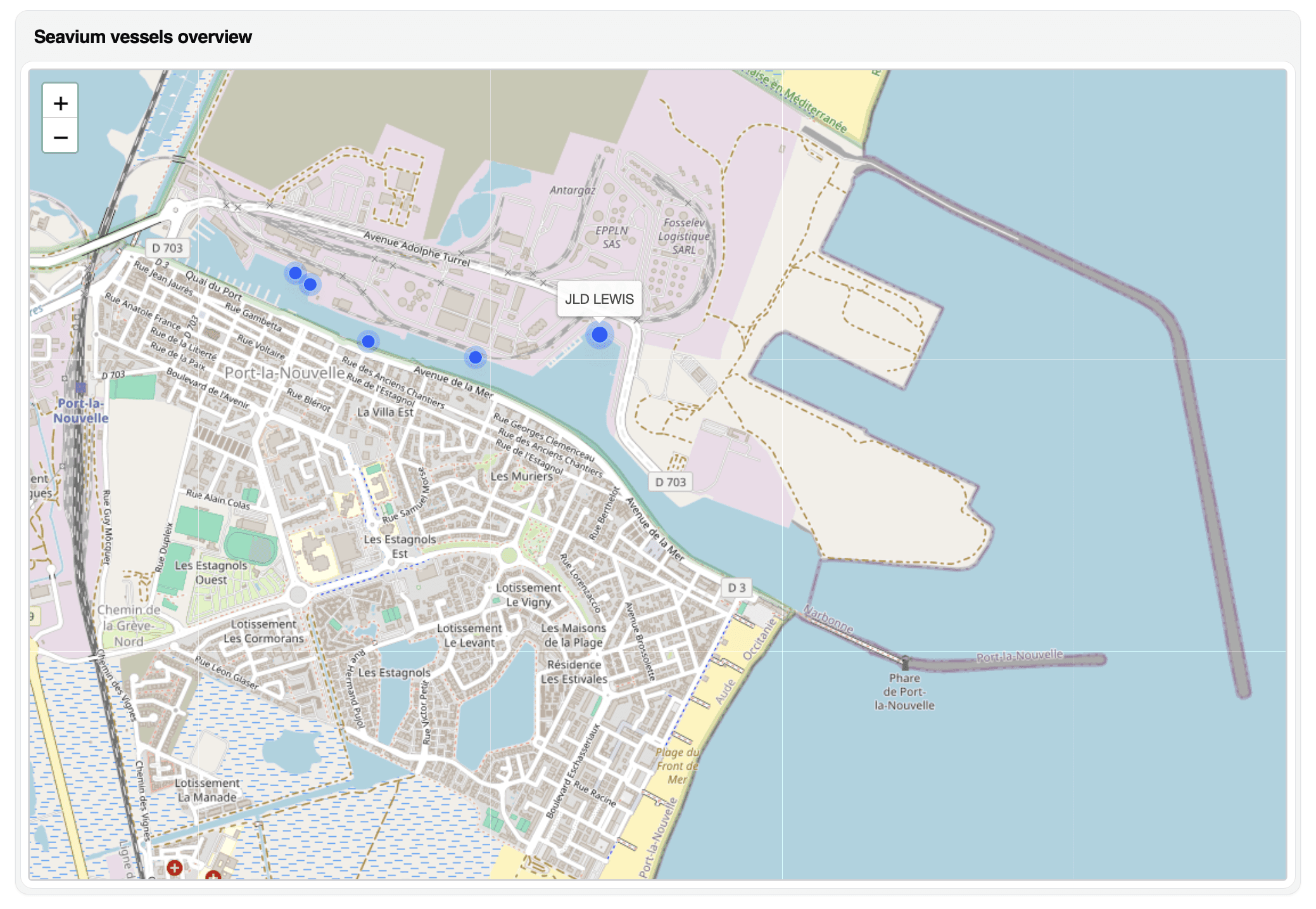
Today, Seavium introduces a new micro-feature on the live map:
The vessel name now appears instantly on hover, without clicking.
This article explains why vessel name identification is a key bottleneck in map-based workflows, how professionals traditionally handle dense areas, and how hover-based names significantly improve daily productivity.
Why Dense Areas Are the Hardest Use Case
In offshore operations, some zones concentrate a very high number of vessels:
Major ports
Offshore wind hubs
Construction areas
Maintenance bases
Anchorage and standby zones
In these environments, users often face:
20, 30, sometimes 50+ vessels in a very small area
Overlapping icons
Similar positions
Limited screen space
In such contexts, the difficulty is not locating vessels.
It is identifying them quickly and reliably.
The Traditional Workflow: Click to Know, Click Again, Click Again
On most platforms, identifying vessel names still requires:
Click on a vessel
Open a popup or a panel
Read the name
Close
Click on the next vessel
Repeat
In dense areas, this leads to three inefficiencies.
1. Exponential number of clicks
When dozens of vessels are present,
simple identification becomes a repetitive task.
Time is lost on pure navigation, not on decision-making.
2. Broken visual rhythm
Each click interrupts:
Map reading
Pattern recognition
Spatial understanding
Users lose the ability to scan areas fluidly.
3. Increased risk of confusion
In crowded zones, misclicks are frequent.
This leads to:
Opening the wrong vessel
Losing track of which unit was already checked
Slower identification of the right asset
The Seavium Approach: Instant Vessel Name on Hover
With this new feature, Seavium introduces a simple but powerful improvement:
👉 When you move the cursor over a vessel icon, its name appears instantly.
No click.
No panel.
No context switch.
The user can now:
Sweep the cursor over an area
Read vessel names one after another
Identify a target vessel in seconds
Click only when necessary
This transforms the map from a clickable interface
into a readable, scan-friendly workspace.
What Changes in Practice
Faster Asset Identification
Instead of:
Click → Read → Close → Click → Read → Close
Users now:
Hover → Read → Hover → Read → Decide
This reduces dramatically the number of interactions required.
Better Handling of Very Dense Zones
In ports and hubs, users can now:
Rapidly list mentally the vessels present
Identify owners and fleets
Spot known units immediately
Detect new or unexpected assets
The map becomes explorable, not only clickable.
Preserved Cognitive Flow
Because no panel opens, no page loads, no context switches occur.
Users keep:
Spatial memory
Visual continuity
Short-term shortlist in mind
This is especially valuable for professionals who:
Monitor the same zones every day
Track fleet movements
Work under time pressure
Who Benefits Most from Hover-Based Names?
For Brokers
Faster market scanning
Quicker identification of known vessels
More efficient first screening
Less navigation friction
For Charterers
Faster asset discovery in project areas
Better understanding of local availability
Quicker targeting of specific vessels
For Owners
Higher visibility of vessel names
Easier recognition of their fleet on the map
More qualified clicks on relevant units
Hover acts as a first identification layer before deeper analysis.
From Micro-Features to Macro-Productivity
This feature illustrates an important design principle.
In professional software,
small interface improvements can generate massive productivity gains.
Seavium is not only adding data or filters.
It is systematically removing:
Useless clicks
Unnecessary panels
Friction in everyday workflows
The ambition is clear:
Make vessel search not only more powerful,
but faster at every single interaction.
Conclusion
In dense offshore areas, vessel identification is a daily bottleneck.
By introducing instant vessel names on hover, Seavium:
Reduces navigation time
Improves map readability
Preserves user focus
Accelerates asset identification
This is a micro-feature.
But for professionals who spend hours per day on maps,
it is a major productivity upgrade.
Have a look on Seavium: go.seavium.com
If you want to see this feature in action or discuss your map workflows, you can book a demo here:
https://calendly.com/adrien-seavium/30min
offshore vessel map, vessel name hover, live vessel identification, offshore chartering platform, AIS map interface, fleet monitoring, vessel tracking software, offshore operations tools