
Brokers, charterers and project managers spend hours every day:
Scanning maps
Opening vessel pages
Checking positions
Comparing candidates
Closing tabs
Starting again
In this workflow, a simple inefficiency becomes a real cost:
How fast can you identify whether a vessel is worth opening in detail?
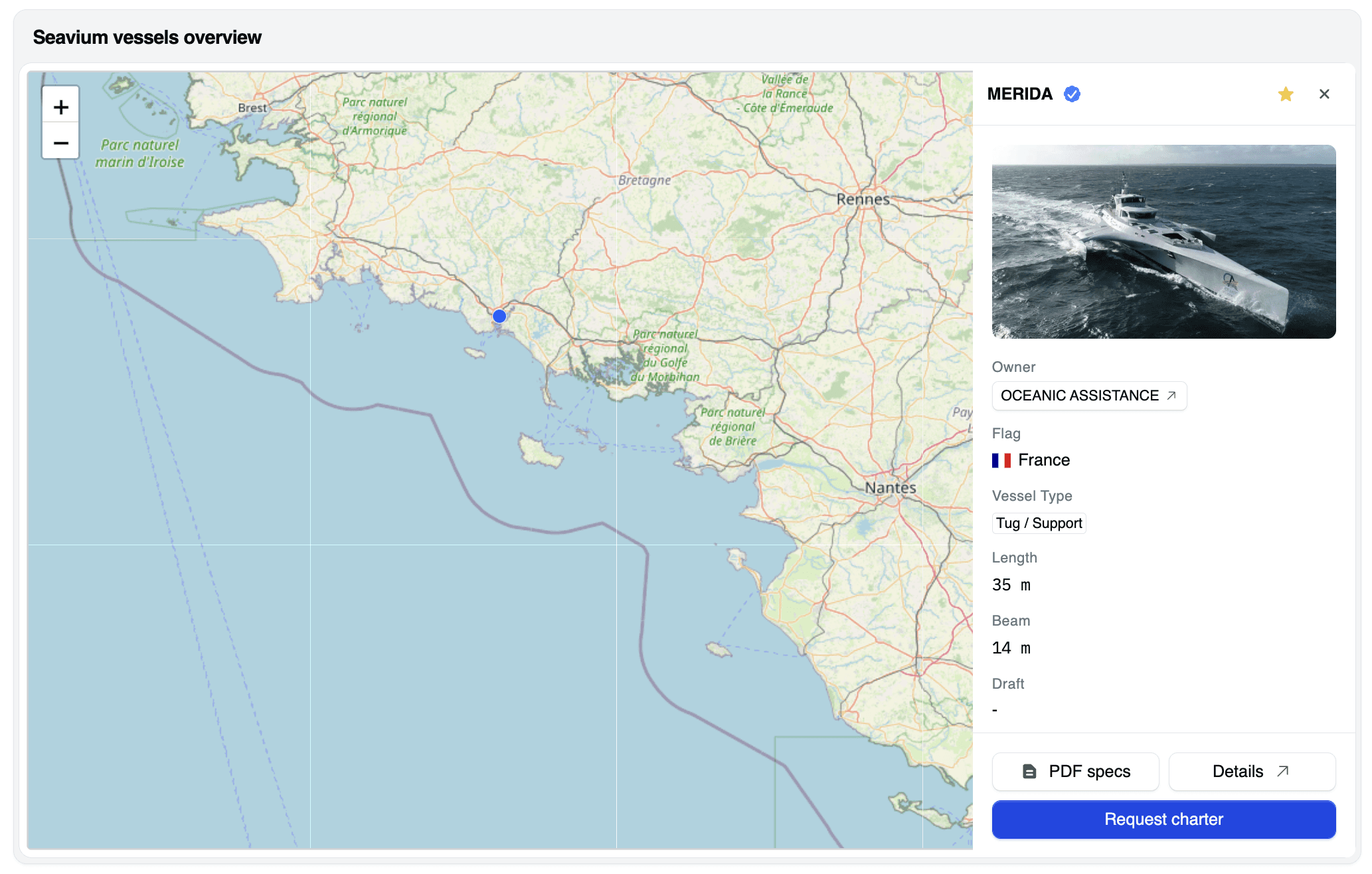
Today, Seavium introduces a new feature on the live map:
A lateral preview panel that opens instantly when you click on a vessel.
This article explains why map-based search is central in offshore chartering, how professionals traditionally navigate between vessels, and how instant preview changes the way vessel screening is done.
Why Map-Based Search Is Central in Offshore Chartering
In offshore operations, geography is not context.
It is a core decision parameter.
Professionals constantly need to answer questions such as:
Which vessels are close to my project area?
Which units are mobilizable quickly?
Which fleets are active in this region?
Which candidates can realistically compete?
For this reason, map-based search is often the first screen opened in the morning.
But map usage also creates a specific challenge:
high interaction density.
Users click on dozens, sometimes hundreds of vessels per day.
The Traditional Workflow: Too Many Clicks, Too Much Context Switching
On most platforms, the workflow is still the same:
Click on a vessel on the map
Open a full vessel page
Wait for page load
Read key data
Close or go back
Click on the next vessel
Repeat
This creates three inefficiencies.
1. Constant context switching
Each click fully interrupts the map workflow.
Users lose:
Geographic context
Shortlist memory
Comparison speed
2. Time wasted on non-relevant vessels
Many vessels are opened in detail
only to discover in a few seconds that they are not suitable.
This creates unnecessary friction.
3. Cognitive overload
Switching continuously between:
Map
Vessel pages
Tabs
Reduces focus and slows down decision-making.
The Seavium Approach: Instant Lateral Preview on the Map
With this new feature, Seavium introduces a lateral preview panel directly integrated into the live map.
When you click on a vessel:
A side panel opens instantly
The map remains visible
You keep geographic context
You access key vessel information immediately
Without leaving the map.
The preview typically includes:
Vessel name and photo
Owner
Flag
Vessel type
Main dimensions
Quick access to PDF specs and full details
Direct “Request charter” action
What Changes in Practice
Faster First Screening
Instead of opening full pages, users can now:
Click
Read
Decide
Move on
In seconds.
This dramatically reduces the number of full page loads.
Better Visual Comparison
Because the map stays visible, users can:
Compare several vessels in the same area
Understand relative positions
Identify clusters and availability patterns
Screening becomes geographic and technical at the same time.
Preserved Workflow Continuity
No more constant back-and-forth.
The search flow remains continuous.
This is especially critical for users who:
Screen dozens of vessels per hour
Build shortlists under time pressure
Work on multiple projects in parallel
Who Benefits Most from Instant Preview?
For Brokers
Faster market scanning
Quicker identification of competitive vessels
More efficient shortlisting
Less time lost on non-relevant units
For Charterers
Faster feasibility checks
Better understanding of regional availability
Quicker pre-selection before technical deep dives
For Owners
Higher visibility for relevant vessels
More qualified clicks
Fewer irrelevant page visits
Preview acts as a first qualification layer.
From Vessel Pages to Workflow Design
This feature illustrates a broader design philosophy.
Seavium is not only adding data.
It is redesigning professional workflows.
The objective is simple:
Reduce useless clicks
Preserve context
Accelerate first decisions
Respect how offshore professionals really work
In a market where time is critical,
interface design becomes a competitive advantage.
Conclusion
For many users, vessel search is not about finding one vessel.
It is about screening hundreds of candidates efficiently.
By introducing the lateral preview panel on the live map, Seavium:
Speeds up first screening
Reduces friction
Preserves geographic context
Improves daily productivity
This is not a visual improvement.
It is a workflow improvement.
Have a look on Seavium: go.seavium.com
If you want to see this feature in action or discuss your search workflows, you can book a demo here:
https://calendly.com/adrien-seavium/30min
offshore vessel map, live vessel tracking, vessel search interface, offshore chartering platform, AIS vessel map, fleet monitoring, vessel availability map, offshore operations software